
Web UI
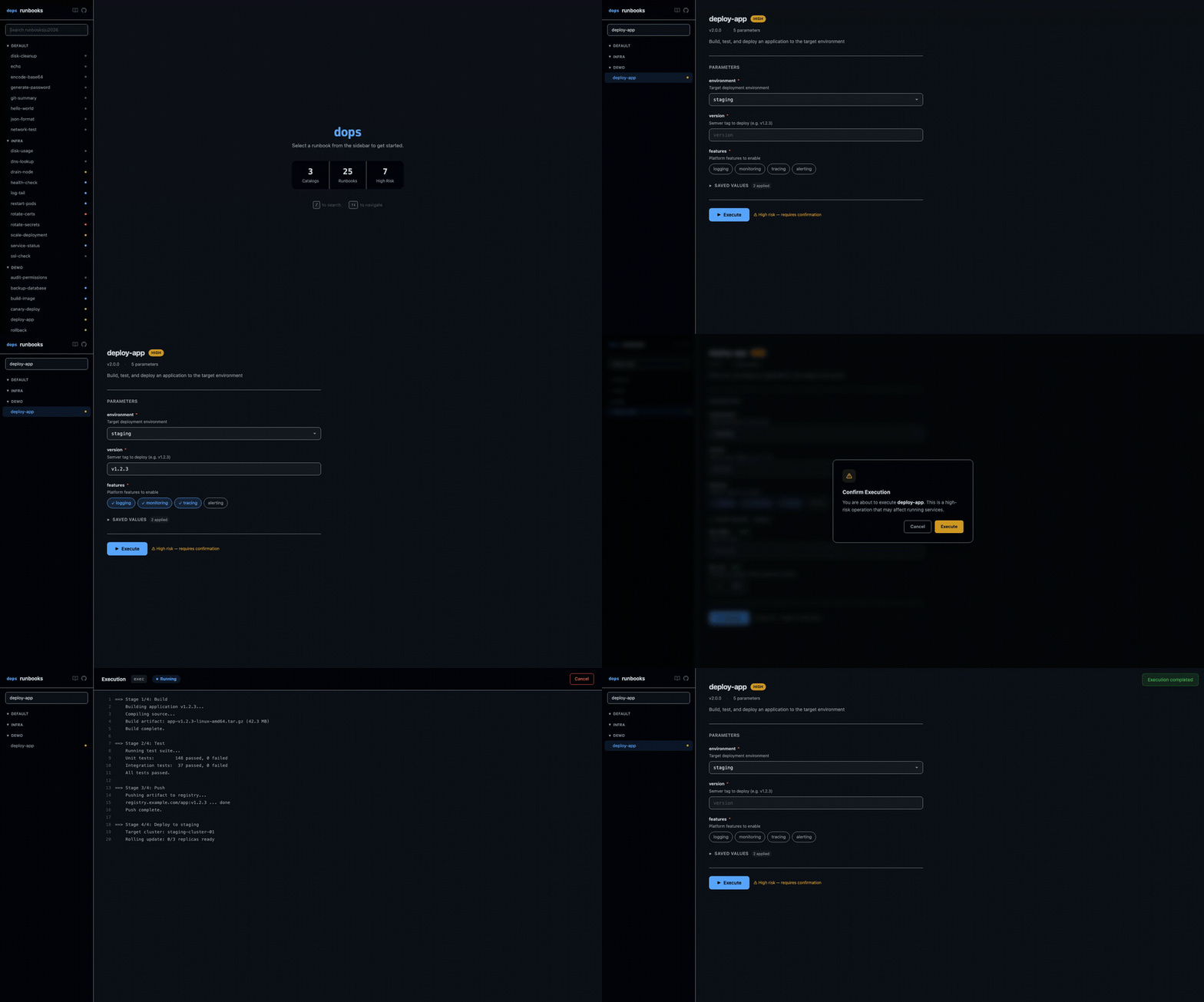
dops includes a browser-based interface that mirrors the TUI experience. Launch it with dops open.
Quick Start
dops openThis starts a local web server on port 3000 and opens your default browser. Press Ctrl+C to stop the server.
# Custom port
dops open --port 8080

# Start without opening browser
dops open --no-browser
Features
Catalog Sidebar
The left sidebar displays all configured catalogs and runbooks. Use the search box to filter by name or description — catalogs with no matching runbooks are hidden automatically.
Risk indicators appear as colored dots next to each runbook:
- Green — low
- Blue — medium
- Orange — high
- Red — critical
Parameter Forms
When you select a runbook, the main panel shows a parameter form with input types matched to the parameter schema:
| Parameter Type | Input Control |
|---|---|
string | Text input |
boolean | Segmented toggle (Yes / No) |
select | Dropdown menu |
multi_select | Chip/pill buttons (click to toggle) |
secret | Password input (masked) |
Saved values are pre-filled automatically and grouped in a collapsible "Saved values" section with green badges. Expand the section to review or override them.
Risk Confirmation
High and critical risk runbooks show a confirmation dialog before execution:
- High risk — click "Execute" to confirm
- Critical risk — type
CONFIRMto proceed
Press Escape to cancel.
Live Execution Output
After confirming, the execution view streams stdout/stderr in real time with:
- Line numbers in a left gutter
- ANSI color support
- Status pill (Running / Completed / Failed) with elapsed time
- Cancel button to stop a running execution
Themes
The web UI mirrors your configured dops theme. Change it with:
dops config set theme=draculaThen reload the web UI to see the new theme.
Architecture
The web UI is a Vue 3 single-page application built with Vite and Tailwind CSS v4. It is compiled and embedded in the Go binary at build time — no Node.js is required at runtime.
The SPA communicates with the Go backend via a REST API:
| Endpoint | Method | Description |
|---|---|---|
/api/catalogs | GET | List all catalogs and runbooks |
/api/runbooks/:id | GET | Get runbook details with saved values |
/api/runbooks/:id/execute | POST | Execute a runbook |
/api/executions/:id/stream | GET (SSE) | Stream execution output |
/api/executions/:id/cancel | POST | Cancel a running execution |
/api/theme | GET | Get current theme colors |
Execution output is streamed via Server-Sent Events (SSE).
See also
dops opencommand reference- Keyboard Shortcuts — TUI keyboard controls